

A photograph of a crowded street, a celebrity at an event or a product sitting on a table can look completely ordinary at first glance. The image may have convincing lighting, detailed textures and realistic colours, giving you little reason to question what you are seeing. Modern image generators have become good at recreating these details, making it harder to tell how an image was made just by looking at it.
Small errors can still give an AI generated image away. Fingers may blend into an object, writing on a sign may make no sense, reflections may contradict the scene, or background details may not line up. These clues are useful, but none of them proves that an image came from an AI tool. Real photographs can contain visual oddities, too.
Learning to spot AI-generated images takes more than looking for strange hands or distorted faces. A closer inspection, a reverse image search, file metadata and available digital credentials can help establish where an image came from and how it was created. The most reliable judgement comes from several checks, not a single visual clue.
Table of Contents
Visual Signs to Check
Start by examining the small details that are easy to overlook when viewing an image on social media. Zoom in on the areas around people, objects, text and reflections. Look for details that conflict with the rest of the scene instead of treating an unusual feature as proof of AI generation.
1. Look Closely at Hands, Fingers and Faces
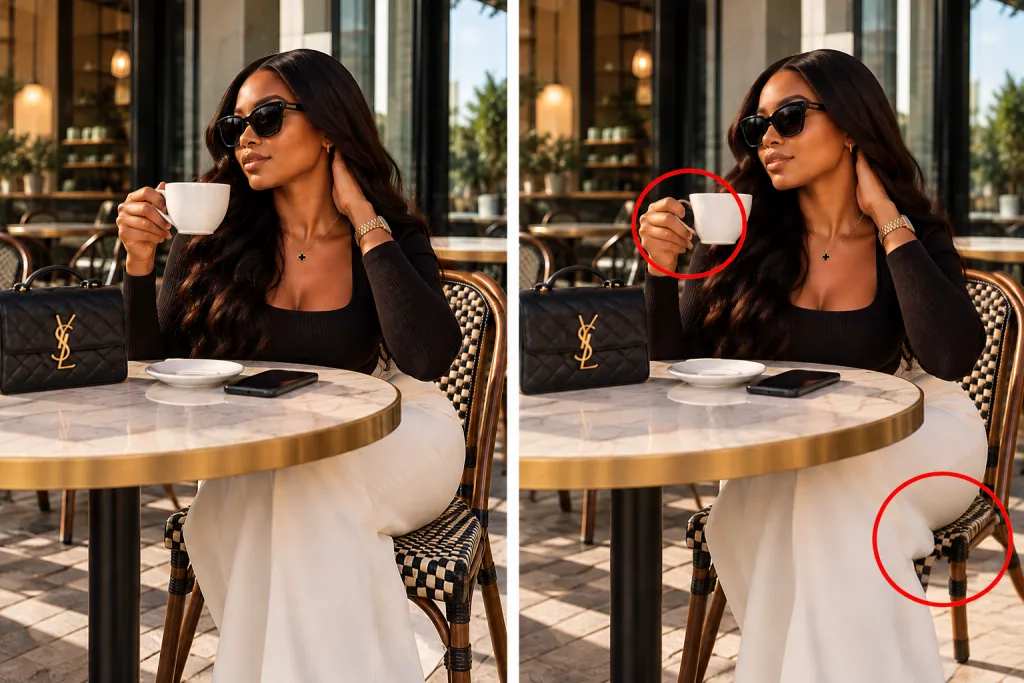
Hands have long been a useful place to inspect AI generated images because generators have sometimes produced extra fingers, fused fingers, awkward joints or hands that do not grip objects naturally. Faces can also contain small errors, particularly around the ears, teeth, eyes and hairline.
Pay attention to how a hand holds a cup, touches another person’s shoulder or rests on a table. Fingers that pass through an object, bend at an impossible angle or merge into a sleeve deserve a closer look. Facial details also deserve attention. Teeth may look strangely uniform, earrings may connect to nothing, and glasses may have uneven frames. Hair can blend into the skin or produce stray strands that seem to grow from nowhere.
Modern image generators can produce convincing hands and faces, so a flawless portrait is not proof of a real photograph. Human faces can also look unusual because of motion blur, heavy retouching, compression or poor lighting. Look for several inconsistencies before drawing a conclusion.

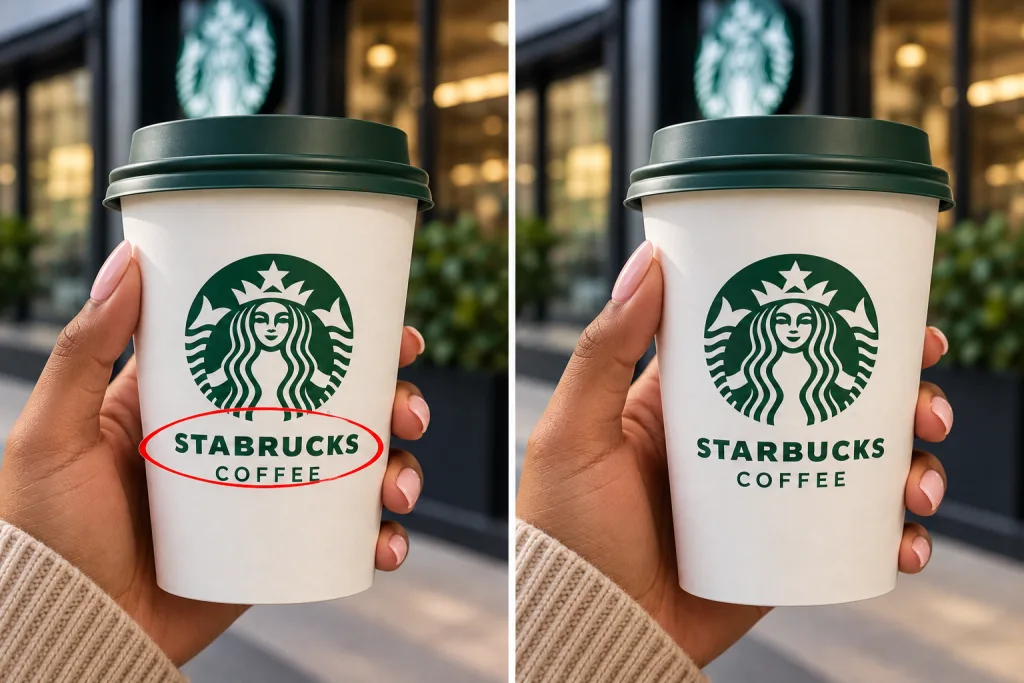
2. Read Signs, Labels and Other Text
Text inside an image can expose problems that are harder to notice elsewhere. AI generated pictures have sometimes included misspelled words, scrambled letters, inconsistent fonts or signs that look plausible from a distance but make little sense when enlarged.
Check shop signs, book covers, product packaging, clothing labels, number plates and writing on screens. Examine individual letters and compare the text with the perspective of the object carrying it. For example, a shopfront might have a clear sign above the door, but one letter could merge into the background or a word could change spelling across the same sign. Product packaging may have a convincing brand logo on the front and unreadable writing on the side.
Text errors are becoming less common as image generators improve, especially when the prompt contains a short, clear phrase. A photograph can also contain blurred or distorted writing because of distance, glare or a low resolution upload. Text problems are a clue to investigate, not a final verdict.
3. Check Light, Shadows and Reflections
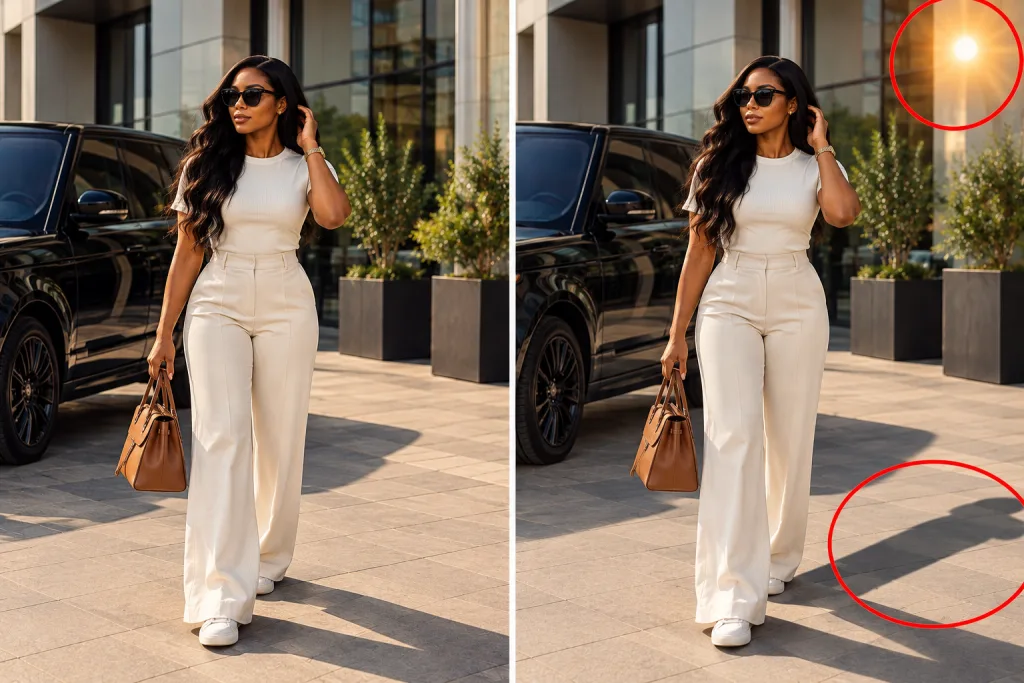
Lighting can make a synthetic image look convincing, but inconsistent light and shadows can expose mistakes. Look at the direction of shadows under people, furniture, cars and other objects. Several objects in the same scene should normally respond to the same light sources in a physically plausible way.
A person’s face might be lit from the left while the shadow on the ground suggests sunlight from the right. A glass may cast a shadow that does not match its shape, or a shiny surface may reflect objects that are not visible anywhere in the scene. Mirrors and windows deserve a close look. A person standing in front of a mirror should have a reflection that matches their pose and position. Reflections in several windows should also make sense in relation to the surrounding buildings and light sources.
These checks are not foolproof. Multiple light sources, flash photography, edited images and unusual camera angles can produce confusing shadows. Look for contradictions that cannot be explained by the scene itself.
4. Inspect the Background and Repeated Patterns
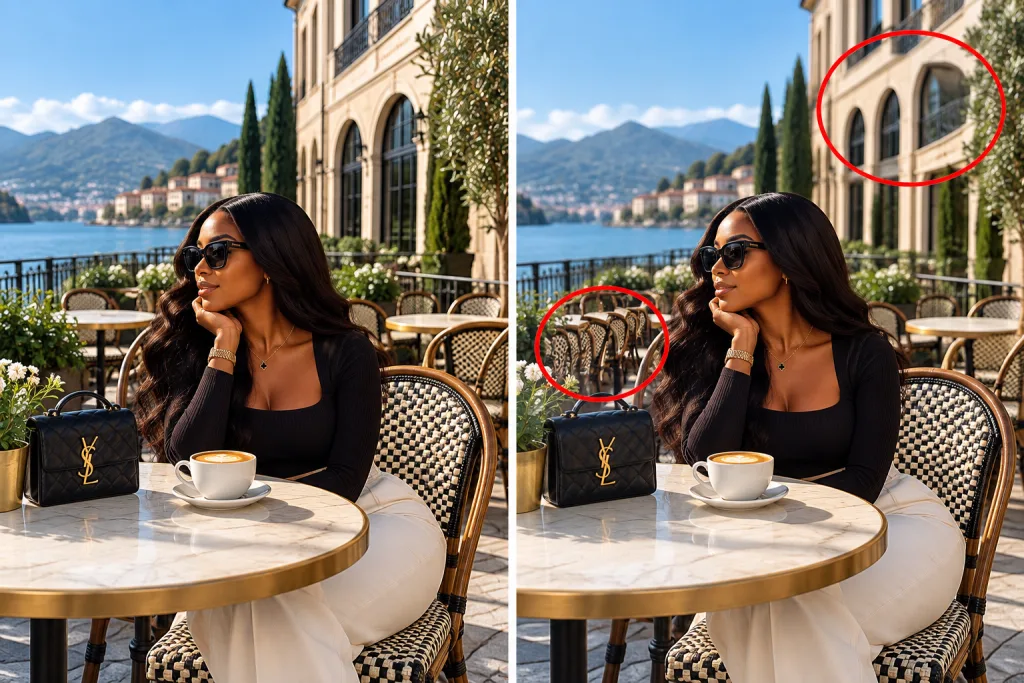
Background details can expose AI generation even when the main subject looks convincing. Buildings may have windows that change shape, railings may bend unexpectedly, and objects in the distance may merge into one another. Repeated patterns are worth checking, too. A row of people might contain two faces with oddly similar features, or a group of chairs might have legs arranged inconsistently. The pattern on a tiled floor could change direction without a clear reason.
Look at the edges of objects as well. A person’s hair may blend into a wall, a bag strap may disappear into a jacket, or a bicycle wheel may connect incorrectly to its frame. The smallest parts of an image are often the most revealing. An image generator can create an impressive overall scene while getting a few background details wrong. However, motion blur, shallow depth of field and compression can also soften or distort those details in real photographs.
5. Examine Skin, Clothing and Material Textures
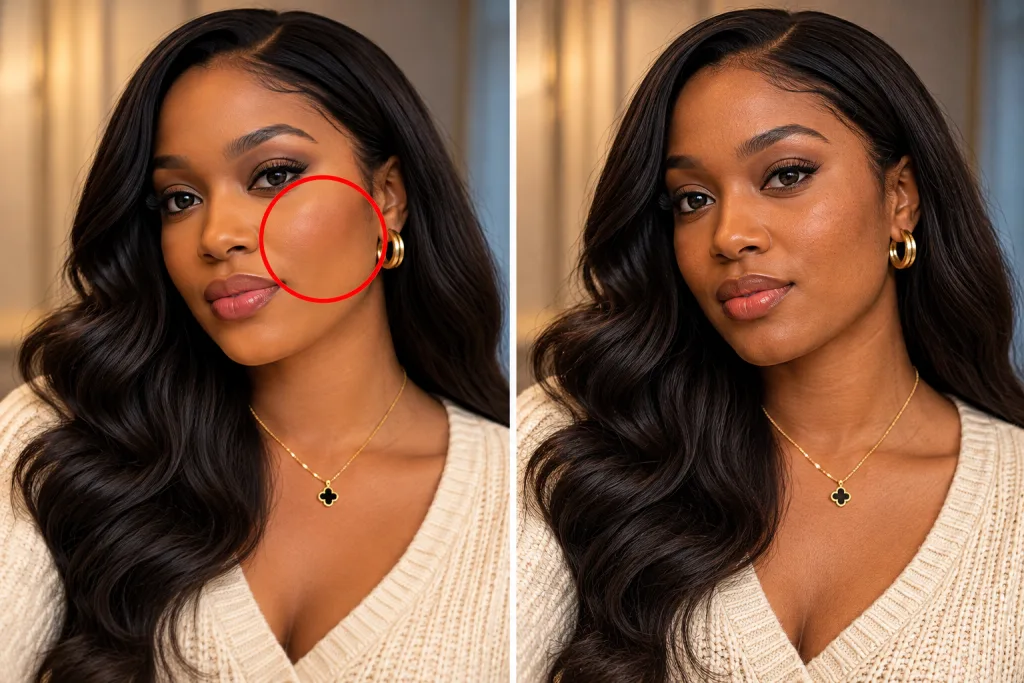
AI generated images can have an overly smooth or polished finish. Skin may look waxy, fabric may have an unusual texture, and hair can form repeated strands that look too similar. Metal, glass, wood and plastic can also lose the small surface details you would expect from a photograph. Look for texture that changes abruptly between neighbouring areas. A shirt might have realistic folds on one side but a melted appearance near the arm. Skin may have sharp pores in one area and a smooth, artificial finish just a few centimetres away.
Be careful not to confuse editing with AI generation. Beauty filters, portrait mode, noise reduction and studio retouching can all produce smooth skin and polished textures. Some AI generated images also imitate camera grain, skin texture and lens blur convincingly.
6. Look for Objects That Do Not Fit Together
An image can contain individually convincing objects that fail to make sense as a complete scene. A chair may have an extra leg, a pair of glasses may lack a connecting arm, or a necklace may disappear into the neck. Check how objects connect, overlap and sit on surfaces. A hand should make physical contact with the item it is holding. A cup should rest on the table without passing through it. Jewellery should follow the shape of the neck or wrist, while straps should connect to the bags or clothing they belong to.
Perspective can also help you spot errors. Furniture, vehicles and buildings should relate sensibly to their surroundings. An object that changes shape unexpectedly, has inconsistent proportions or seems to float without support deserves another look. One strange object is not enough to prove AI generation. Real photographs can capture unusual poses, awkward perspectives and objects partly hidden from view.
How to Check the Original Source of an Image
Visual inspection is only one part of image verification. The account that posted the image, the caption, the date and the surrounding context can help establish its origin. Start with the original post if one is available. Check the account’s history, look for other images from the same event and read the caption carefully. An image claiming to show a recent public event should have some connection to the location, date and people involved.
Reverse image search can also help. Tools such as Google Lens can find matching or visually similar images across the web. Upload the image or use the search tool on a copy, then examine the results. An earlier upload from a photographer, news organisation or official account may help establish where the image came from. Matching images can also show if a picture has been cropped, recoloured or reposted with a misleading caption.
Reverse image search has limits. An AI generated image can be uploaded for the first time without any earlier copy online. An edited photograph may also have few matching results. A lack of search results does not prove the image was made with AI.
Related Article: Africa’s Next Digital Divide May Be AI Literacy, Not Internet Access
How to Check Image Metadata
Metadata is information stored inside a digital file. A photograph may contain the camera model, date and time, exposure settings, location data and software used to edit the file. If you have the original image file, you can inspect its details through your computer’s file information window or a metadata viewer. On a phone, the photo information panel may show its date, dimensions and camera details, depending on the device and file.
Camera metadata can support a claim that an image came from a particular camera, but it does not prove the image is authentic. Metadata can be altered, and image editing or social media platforms often remove some of it during processing. AI generated images may also contain software or creation information, especially when a tool records how the file was made. However, many generated images have no readable creation metadata, and the absence of camera information does not prove that an image was generated by AI.
Treat metadata as one source of evidence. Compare it with the image’s origin, available credentials and other details before deciding how much confidence to place in it.
How to Check Content Credentials and AI Watermarks
Some image creation tools and cameras attach digital information about an image’s origin and editing history. Two examples are Content Credentials, which record an image’s creation history, and Google’s SynthID, which embeds an invisible watermark in AI generated content.
Content Credentials use the C2PA standard to record information about how a digital image was created and edited. When a compatible file has these credentials, a supported verification tool can show the creator or software associated with the file, along with available editing history and information about AI use.
You can inspect supported credentials using compatible tools, including the verification feature in Gemini. The information can help establish how the file was made, but it does not prove that the scene itself is truthful. Credentials may also be absent from an image or incomplete after certain edits.
SynthID is Google’s technology for embedding an invisible digital watermark into content made with its AI tools. Google’s verification features can check an image for a SynthID watermark, helping identify content created or edited by Google AI.
A positive result is useful evidence that Google’s AI tools were used in creating or editing the image. A negative result does not prove that the image is a real photograph, since other AI systems use different methods and may not add a SynthID watermark. Neither system is a universal test for every image. Availability also depends on the file, the software used to create it and the verification tool you can access.
Are AI Image Detectors Accurate?
AI image detectors analyse visual patterns in an image and estimate the likelihood that it was generated or edited using AI. Some are available as online services, while others are built into verification platforms. These tools can help with an initial check, but their results are not conclusive. A detector can flag a real photograph as AI generated or fail to identify a real image. Results can also change after resizing, compression, cropping or other edits.
Performance depends on the detector, the image type and the AI systems represented in its training data. A tool tested on portraits may not perform as well on illustrations, product pictures, screenshots or scientific images.
Do not treat a percentage score as a confirmed fact about an image’s origin. A result showing a high likelihood of AI generation is a reason to investigate further, not proof on its own. For important decisions, combine detector results with source checks, metadata and content credentials.
How to Spot AI-Generated Images on Social Media
Social media posts often lack the original file and its metadata. Images may also be compressed, cropped or edited before they reach your feed, making visual inspection harder. Check who published the image and look at the post’s date, caption and comments. If the image claims to show a public figure, news event or unusual incident, look for confirmation from established news organisations or official accounts. Search for the same scene in other posts to see if the details match.
Be cautious when an image is used to provoke an immediate emotional reaction or support a serious claim. A dramatic photograph can spread quickly even when its source is unclear. Avoid sharing it as fact until you have checked its origin.
If the post includes an AI label or a disclosure from the creator, take that into account. The absence of a label does not mean the image was made without AI, and an AI assisted edit does not necessarily mean the entire picture was generated from scratch.
Can You Be Certain an Image Was Generated by AI?
A visual inspection rarely gives complete certainty on its own. An image containing several odd details may deserve further checking, but those details do not establish its origin beyond doubt. The same applies to detection scores and missing metadata.
The clearest evidence comes from verifiable origin information, a recognised AI watermark or a reliable creation history. Even then, the evidence needs to be interpreted correctly: a watermark may show that AI was used to create or edit an image, while Content Credentials can record only the history available in the file.
To spot AI generated images with greater confidence, inspect the details, check the source, search for earlier copies and review any available metadata or credentials. When the image is being used to support a serious claim, verify the claim independently before trusting or sharing it.