
Signs a Used Phone Has Been Repaired Before are not always easy to spot. A second hand phone can look almost new while having a replaced screen, battery, camera, charging port, or another internal component.
A previous repair does not automatically make a phone a bad purchase. A properly repaired phone can continue working well for years, especially when a quality replacement part was used. The bigger concern is buying a device without knowing its repair history, particularly when the seller claims the phone has never been opened.
Some clues can be spotted during a physical inspection. Others only become obvious when you test the display, cameras, charging, speakers, biometric features, and battery. On certain phones, the software can also show information about replaced components.
No single clue proves that a phone has been repaired. The best approach is to look for several signs, check the manufacturer’s available service information, and test the phone thoroughly before paying for it.
Here are 10 things to check when buying a used phone.
Quick Navigation
1. The Screen Does Not Sit Properly
Start with the display. Look closely at the edges of the screen and check how evenly it meets the frame. A small gap, raised section, uneven edge, or movement in the display can suggest that the phone has been opened or that the screen was fitted poorly. Run your finger gently around the edges without applying pressure.
Also look at the screen from different angles. A replacement display can sometimes have different brightness, colors, bezels, or viewing characteristics from the original panel. A poorly fitted screen is a useful clue, but it is not proof of a previous repair. Physical damage or a damaged frame can produce similar signs.
2. The Screws Have Signs of Previous Work
Check the screws around the phone, particularly those near the charging port on models that use external screws. Look for scratched screw heads, damaged edges, or marks around the screw openings. Several screws showing similar tool marks can suggest that someone has opened the phone.
However, this is only an indication. Normal wear, previous handling, or an attempted repair that did not involve replacing a component can also leave marks. Treat damaged screws as one piece of evidence alongside the other checks in this guide.
3. There Are Uneven Gaps Around the Frame
Inspect the phone from every side. The display, frame, and back panel should generally meet cleanly. Look for a gap that is noticeably wider on one side, a corner that sits higher than the others, or a back panel that does not align properly. These signs can point to poor reassembly after the phone was opened. They can also result from a drop or other physical damage, so do not assume a repair based on gaps alone.
A back panel that is lifting away from the phone deserves particular attention. It can sometimes be associated with a swollen battery, which is a safety concern.
Related Article: Swollen Phone Battery: Causes, Warning Signs, and What to Do Next
4. The Back Panel Looks Different From the Original
Compare the phone with official images of the same model. Pay attention to the finish, texture, camera cutouts, logo placement, color, and alignment. A back panel that looks noticeably different from the original can suggest replacement.
An unusually clean back panel on a phone with heavy wear elsewhere can also prompt a closer inspection. Keep in mind that a case, skin, polishing, or normal wear can change how a phone looks. You need additional clues before concluding that the back panel was replaced.
5. The Touchscreen Has Problems
Test the entire display before buying the phone. Open the keyboard and type across different areas. Scroll through websites and menus. Drag an icon across the screen and test multi touch gestures.
Look for:
- Areas that do not respond
- Delayed touches
- Random touches
- Uneven scrolling
- Problems with multi touch
- Touches that register in the wrong place
A replacement screen can work perfectly, so touchscreen problems do not prove that the display was replaced. They can, however, reveal a faulty display or a repair problem that deserves further investigation.
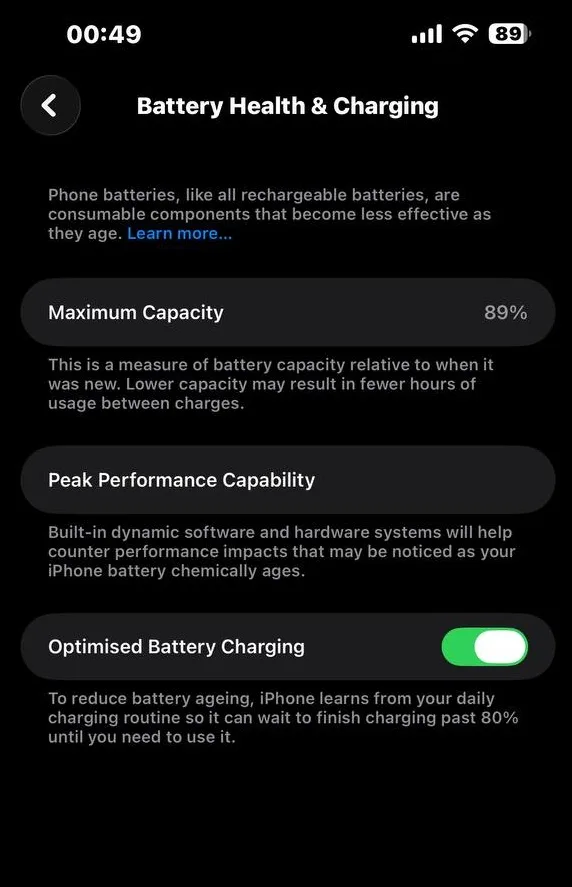
6. The Battery Performance Does Not Match the Phone’s Age
Battery condition is worth checking on any used phone. An older phone with poor battery life may simply have an aging battery. That alone does not indicate that the battery has been replaced.
On an iPhone, go to Settings > Battery > Battery Health & Charging to check the available battery information.
On supported Samsung Galaxy phones, Samsung Members includes a battery diagnostic that can check battery status. A battery that appears unusually fresh in an older, heavily used phone can raise questions about its history. Ask the seller if it has been replaced and request a repair receipt if they claim it has.
7. The Camera Has Problems
Test every camera on the phone. Use the main camera, ultrawide camera, telephoto camera, and front camera where available. Take photos in good lighting and record a short video.
Look for:
- Dust or debris inside the camera area
- Persistent focus problems
- Unusually blurry images
- A camera that refuses to open
- Different image quality between cameras
- Flash problems
- Unusual shaking or stabilization problems
Dust inside a camera module can suggest that the phone was opened, although it can also result from damage to the camera assembly. On supported iPhones, Apple provides more direct information about camera replacements. iPhone 12 models and later can show camera service information in Parts and Service History when applicable.
8. Face ID, Fingerprint Unlock, or Other Features Do Not Work
Test the security features before buying the phone. On an iPhone with Face ID, set up or test Face ID. On a phone with a fingerprint reader, register a fingerprint and test it several times.
Also test features such as:
- Proximity sensor
- Automatic brightness
- Vibration
- NFC
- Gyroscope
- Accelerometer
- Wireless charging
- Buttons
A failed feature does not automatically mean the phone was repaired. Software problems, damage, age, or component failure can produce similar symptoms. Still, several failed features deserve an explanation from the seller.
9. The Charging Port Feels Loose or Works Only at Certain Angles
Connect a compatible charging cable and see how it fits. The connector should sit securely. Check that the phone begins charging normally and continues charging without needing the cable to be held in a particular position. A loose port can be caused by years of use, dirt, physical damage, or previous repair work. It is therefore not proof that the charging port has been replaced.
If charging cuts in and out, test another compatible cable before blaming the phone. A faulty cable can produce the same issue.
10. The Phone Shows Parts or Service Information
This is one of the most useful checks on supported iPhones. On an iPhone running iOS 15.2 or later, open:
Settings > General > About
If applicable, you will see Parts and Service History. Apple says the section can show labels including Genuine, Used, Unknown, and Unverified, depending on the component and device. On supported models, it can provide information about the battery, display, logic board, front camera, and rear cameras.
For example, Genuine indicates that the repair used genuine Apple parts and processes. Used indicates that the part had previously been installed in another iPhone. Unknown can appear when a part is nongenuine, is not functioning as expected, has not been verified and linked to the phone, or has another issue that prevents verification.
The absence of Parts and Service History does not prove that an iPhone has never been repaired. The information shown depends on the model, iOS version, and components involved.
How to Check a Used Phone Before Buying It
Checking for previous repairs is only part of buying a used phone safely. You should also test the phone itself before handing over your money.
Check the IMEI
Find the phone’s IMEI and make sure the information matches the device. You can usually find it in the phone’s settings. On many phones, dialing *#06# also displays the IMEI. If the IMEI shown by the phone does not match the packaging or other documentation supplied by the seller, ask for an explanation before buying.
Check the Display
Open a white image and a dark image. Look for dead pixels, bright spots, dark patches, burn in, unusual discoloration, and uneven brightness. Then test touch response across the entire screen.
Test Every Camera
Take photos with every available camera. Record a video and play it back. Check autofocus, image quality, stabilization, microphone recording, and the flash.
Test the Speakers and Microphone
Play music through the speakers and listen for distortion, buzzing, or crackling. Record a voice note and play it back to test the microphone.
Test WiFi, Bluetooth, and Mobile Network
Insert your SIM card where possible. Make a call, send an SMS, connect to WiFi, and test Bluetooth with a compatible device. If the phone supports NFC, test that feature too.
Check the Charging
Connect a suitable charger and confirm that the phone charges normally. If the device supports wireless charging, test that as well.
Check the Battery
Use the phone for several minutes while testing different functions. Open the camera, play a video, browse the web, and increase the screen brightness. Watch for unusually rapid battery loss, excessive heat, or charging problems.
How to Check if an iPhone Has Been Repaired
Apple provides a useful built in check for supported iPhones.
Go to:
Settings > General > About
Then look for Parts and Service History.
Apple says iPhone 12 models and later can show information about the battery, display, logic board, front camera, and rear cameras. iPhone 11 models can show battery and display information, while the iPhone XR, iPhone XS, iPhone XS Max, and iPhone SE models from the second and third generations can show battery information.
You should also test Face ID, cameras, display, True Tone where applicable, speakers, microphone, charging, buttons, and battery. Do not treat one failed feature as proof of a repair. Use the software information and physical inspection together.
Apple also recommends checking Activation Lock when buying a pre owned iPhone. Do not buy an iPhone that displays iPhone Locked to Owner.
How to Check if a Samsung Phone Has Been Repaired
Samsung does not provide a universal repair history screen equivalent to Apple’s Parts and Service History across all Galaxy phones. You can still run useful hardware checks through the Samsung Members app on supported Galaxy devices.
Open Samsung Members, go to Diagnostics, then choose Phone diagnostics. Samsung says available tests can include the battery, camera, touch screen, fingerprint recognition, face recognition, speakers, microphone, charging, USB connection, WiFi, Bluetooth, NFC, sensors, mobile network, and other functions. The available tests can differ depending on the model.
These diagnostics can help you find hardware problems, but they should not be treated as a complete repair history. For a used Galaxy phone, combine the diagnostic results with a physical inspection and questions about previous repairs.
Does a Repaired Phone Mean It Is Bad?
No. A repaired phone can still be a good purchase.
For example, replacing an old battery can restore battery life, while replacing a damaged display can return the phone to normal use. Apple also notes that genuine used Apple parts can function in another iPhone, although prior use or modification can affect their performance and quality.
The bigger concern is a phone with undisclosed repairs, poor quality replacement parts, incomplete repairs, or other unresolved faults. Ask the seller what was repaired, why it was repaired, which component was replaced, and who carried out the work. A repair receipt is useful evidence when one is available.
Should You Buy a Used Phone That Has Been Repaired?
You can, as long as you know what was repaired and the phone passes your checks. A repaired phone can even be a better purchase than a more expensive device with hidden damage.
Before buying, ask:
- What was repaired?
- Why was it repaired?
- Which component was replaced?
- Was the replacement part genuine or compatible?
- Who carried out the repair?
- When was the repair done?
- Is there a repair receipt?
- Is any repair warranty still active?
Compare the seller’s answers with what you find during your inspection. A seller who openly explains the repair and provides evidence is easier to assess than someone who refuses to answer basic questions or will not let you test the phone.
What Are the Biggest Red Flags on a Used Phone?
Some signs deserve extra attention because they can point to more serious problems. Be cautious when you find several of these at the same time:
- A screen that is lifting from the frame
- A back panel that is separating from the phone
- Multiple damaged screws
- Cameras with dust or focus problems
- A charging port that works only at certain angles
- Biometric features that do not work
- Several hardware functions failing diagnostic tests
- Parts and Service History showing an unexpected replacement
- An IMEI mismatch
- A seller refusing to let you test the device
One sign alone does not tell the full story. Several signs together can give you a much clearer picture of the phone’s condition.
The Signs a Used Phone Has Been Repaired Before can range from visible signs around the frame to information stored in the phone’s software. A poorly fitted screen, damaged screws, uneven gaps, unusual camera behavior, or charging problems can all justify a closer inspection.
For supported iPhones, Parts and Service History can provide direct information about certain replaced components. Samsung Galaxy owners can use Samsung Members diagnostics to test many hardware functions, although those tests do not provide a complete repair history.
Most importantly, do not reject a phone simply because it has been repaired. Find out what was repaired, how well it works now, and what parts were used. A few minutes spent checking the phone before payment can save you from taking home a device with problems that were never mentioned in the listing.