

The specification sheet says 16GB RAM. The small print says 8GB of that is virtual. For millions of Android buyers, that distinction never gets explained, and manufacturers have little incentive to clarify it. Virtual RAM on android is one of the most widely advertised and least understood features in the Android market today. This article explains what it actually does, what it does not do, and when it is worth paying attention to.
What Is Virtual RAM?
Physical RAM, the LPDDR5 memory chips soldered onto your phone’s motherboard, is where your device runs active processes. It is fast, directly accessible, and finite. When it fills up, the Android operating system has to make decisions about what stays and what goes.
Virtual RAM is a software solution to that problem. It works by allocating a portion of your phone’s internal storage, the UFS flash memory that holds your photos, apps, and files, to act as overflow memory when physical RAM runs out. Think of it this way: your physical RAM is your desk. Everything on it is immediately reachable. Your internal storage is a bookshelf across the room. You can get to it, but it takes longer, and that delay adds up.
Every major Android manufacturer has given this feature its own branded name. Samsung calls it RAM Plus. Xiaomi, Redmi, and POCO label it Memory Extension. OPPO and Realme use RAM Expansion or Dynamic RAM Expansion. Vivo and iQOO call it Extended RAM. The underlying mechanism is the same across all of them.
It is also worth noting that Android already uses a separate memory compression system called zRAM, which compresses inactive data within the physical RAM itself. Virtual RAM is an additional layer on top of that, and it relies on storage that is significantly slower than the compressed physical memory zRAM works with.
How Android RAM Expansion Actually Works
When your physical RAM is full, the Android OS identifies background apps that are inactive, apps you opened earlier but are not currently looking at, and moves their data into the virtual RAM space on your storage drive. This process is called paging or swapping.
The speed gap between physical RAM and internal storage is the issue. LPDDR5 RAM operates at speeds that internal storage, even fast UFS 4.0 drives, cannot match. When an app’s data needs to be retrieved from virtual RAM, it takes measurably longer to load back into the active memory space than if that data had stayed in physical RAM. This does not make virtual RAM useless. It means you need to be precise about what it actually does.
Does Virtual RAM Make Your Phone Faster?
Virtual RAM does not make your phone faster. It does not increase CPU performance. It does not improve frame rates in games. It does not speed up app launch times.
What it does is allow more apps to stay alive in the background without being killed by the system. When you switch back to an app you opened an hour ago, virtual RAM increases the probability that the app is still in memory and resumes exactly where you left off, instead of reloading from scratch. That is a multitasking improvement, not a speed improvement. The distinction is meaningful.
For gaming, virtual RAM is largely irrelevant and can work against you. A heavy game running on a phone that has pushed some of its data into virtual RAM may experience stuttering when it tries to access that data, because the read speeds from storage are slower than what the game expects from memory. Virtual RAM does not fix lag in demanding games. If anything, it can introduce new inconsistencies.
The devices that actually benefit from virtual RAM are budget phones with 4GB or 6GB of physical RAM. On these devices, app crashes and constant reloading are real problems, and virtual RAM provides a buffer that stabilises the experience. On flagship phones with 12GB or more of physical RAM, the benefit is virtually zero. The physical RAM rarely fills up to a point where the overflow system kicks in at all.
What Virtual RAM Does Well and Where It Fails
Virtual RAM has costs that are worth understanding before you switch it on and leave it running.
The first is storage. If you allocate 8GB of virtual RAM, you lose 8GB of actual storage space for photos, videos, and apps. On a budget phone that ships with 64GB of storage, that is a meaningful reduction.
The second is battery. Moving data between physical RAM and storage requires CPU cycles. This process runs in the background and contributes to slightly higher power consumption compared to a phone that keeps everything in physical RAM. The difference is not dramatic, but it exists and compounds over a full day of use.
The third is storage lifespan. NAND flash memory, the type used in phone storage, has a finite number of read and write cycles. Constant swapping between RAM and storage technically accelerates wear on the storage chip over several years. For most users upgrading their phones every two to three years, this is unlikely to be a concern. For users who keep phones longer, it is worth knowing.
How to Turn Virtual RAM On or Off on Android
On Samsung devices, go to Settings, then Battery and Device Care, then Memory, then RAM Plus. On other Android brands, the path varies but is usually found under Settings, then Additional Settings or About Phone, then RAM or Memory.
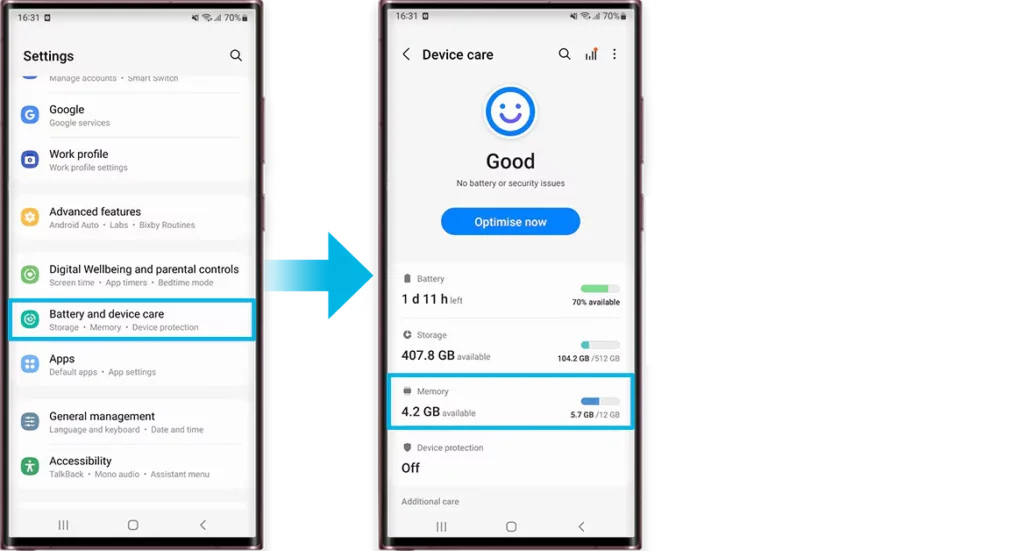
The general recommendation is this: if you have a budget phone with 4GB or 6GB of RAM and you notice frequent app crashes or constant reloading, turn virtual RAM on. It will help. If you have a flagship phone with 12GB or more of physical RAM, turn it off. You will reclaim the storage space and lose nothing in day-to-day performance.
Virtual RAM is a practical tool in specific circumstances and a marketing number in others. For budget Android phones, it provides a stabilising effect on multitasking. For flagship devices, it is largely a number on a spec sheet designed to make the storage configuration look more impressive.
The next time you see a phone advertised as having 16GB of RAM, check what portion is physical and what portion is virtual. A phone with 8GB physical RAM and 8GB virtual RAM performs meaningfully differently from one with 16GB of physical RAM. That distinction does not always make it into the marketing copy.
Frequently Asked Questions
Does virtual RAM drain battery?
Yes, slightly. Moving data between storage and RAM uses CPU cycles, which increases power consumption marginally.
Does virtual RAM help with gaming?
No. It does not improve frame rates and can cause stuttering if game data gets moved to the slower storage-based memory.
Does enabling virtual RAM reduce storage space?
Yes. Whatever amount you allocate comes directly out of your available internal storage.
Is RAM Plus the same as virtual RAM?
Yes. RAM Plus is Samsung’s name for virtual RAM. Other brands use different names for the same underlying feature.
Should I turn on virtual RAM on my phone?
Only if you have 6GB of physical RAM or less and experience frequent app crashes. On higher-RAM devices, it offers no practical benefit.