
Your Wi-Fi may work perfectly in the living room but struggle to load a video in the bedroom. You might also notice that your phone connects to one network name while another device uses a second one. If your router has both 2.4GHz and 5GHz bands, the difference between them could explain some of these experiences.
The 2.4GHz vs 5GHz Wi-Fi debate comes down to speed, range and how well each band handles obstacles. One can cover more distance, while the other can deliver faster connections at shorter distances. Knowing which one to use can help you get better performance from your router. Here’s how the two bands compare and when to connect your devices to each one.
Table of Contents
What Is the Difference Between 2.4GHz and 5GHz Wi-Fi?
Both are Wi-Fi frequency bands used by wireless routers to connect phones, laptops, smart TVs and other devices to the internet. The main differences are their coverage, speed and susceptibility to interference.
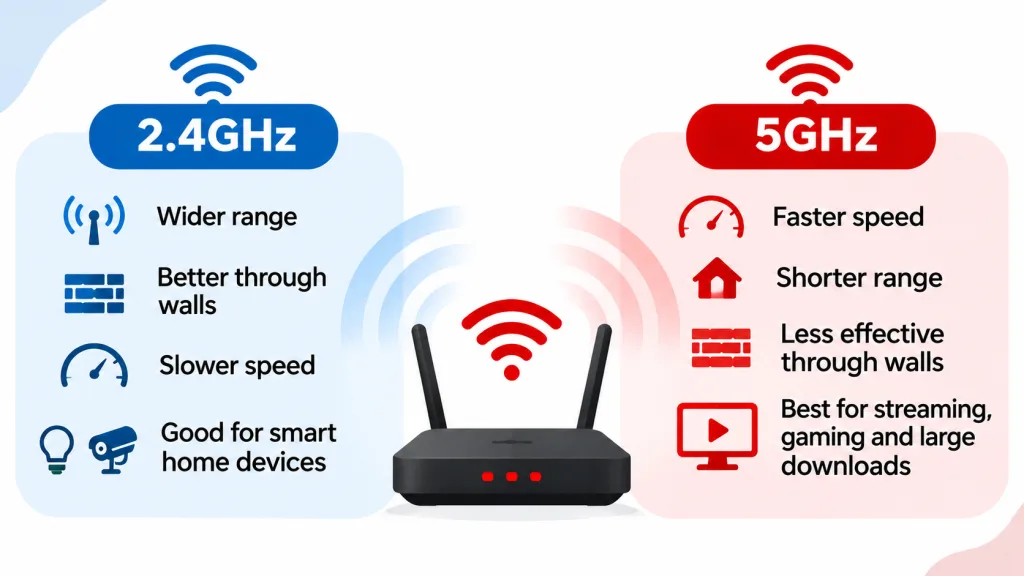
The 2.4GHz band has a longer range and handles walls and other obstacles better. It is also supported by many older devices and smart home products. Its main drawback is congestion. Many nearby Wi-Fi networks and household electronics use this band, which can affect connection quality.
The 5GHz band supports faster data transfer and has more available channels, so it often performs better in areas with several nearby Wi-Fi networks. Its signal does not travel as far as 2.4GHz and has more trouble passing through walls and floors.
2.4GHz vs 5GHz Wi-Fi
| Feature | 2.4GHz Wi-Fi | 5GHz Wi-Fi |
|---|---|---|
| Speed | Usually slower | Usually faster |
| Range | Longer coverage | Shorter coverage |
| Wall penetration | Better | Less effective |
| Interference | More crowded | Generally less crowded |
| Available channels | Fewer | More |
| Device compatibility | Wider support | Requires compatible devices |
| Best use | Basic browsing and devices far from the router | Streaming, gaming and large downloads near the router |
Actual speeds depend on your router, Wi-Fi standard, connected device and network conditions. A 5GHz connection does not automatically guarantee faster internet if your router or device has limited capabilities.
Related Article: Why Does My WiFi Keep Disconnecting?
When Should You Use 2.4GHz Wi-Fi?
The 2.4GHz band is a good choice when your device is far from the router or separated by several walls. Its wider coverage helps maintain a connection in rooms where 5GHz signals may become weak.
It also works well for devices that do not need much bandwidth. Examples include:
- Smart bulbs and plugs.
- Wireless security cameras.
- Smart speakers.
- Internet-connected appliances.
- Phones and laptops used for basic browsing.
- Devices located in rooms far from the router.
Some smart home products only support 2.4GHz Wi-Fi. If you cannot connect a new smart bulb, camera or plug to your network, check its specifications before troubleshooting the router.
The main downside is congestion. In an apartment building or a busy neighbourhood, several nearby routers may use the same 2.4GHz channels. Microwaves and other household electronics can also interfere with the signal.
When Should You Use 5GHz Wi-Fi?
Choose 5GHz when you want faster wireless speeds and your device is close enough to the router to receive a good signal.
It is particularly useful for activities that involve frequent data transfers, including:
- Streaming movies and TV shows in high resolution.
- Playing online games.
- Downloading large files.
- Video calls and online meetings.
- Transferring files between devices on your home network.
The band has more available channels than 2.4GHz, which can help reduce congestion when several nearby networks are active.
There is one catch: the signal loses strength more quickly when it passes through walls and floors. If your router is downstairs and your gaming PC is upstairs, a 5GHz connection may not perform as well as expected.
Does 5GHz Wi-Fi Have a Shorter Range?
Yes. Under similar conditions, 5GHz Wi-Fi has a shorter range than 2.4GHz.
The higher frequency makes it harder for the signal to pass through solid objects such as concrete walls, floors and large furniture. As you move farther away from the router, the 5GHz connection may become weaker.
For example, your phone may get excellent speeds in the room where the router is located but struggle in a bedroom at the other end of the house. The 2.4GHz band may work better in that bedroom because its signal travels farther and passes through obstacles more effectively. The actual coverage also depends on your router’s antennas, transmission power, building materials and nearby interference.
Does 2.4GHz Wi-Fi Have More Interference?
Yes. The 2.4GHz band has fewer non-overlapping Wi-Fi channels, and many household devices use the same frequency range. Nearby routers can compete for airtime, particularly in apartment buildings where several networks operate close together. Bluetooth devices, cordless phones and microwave ovens can also contribute to interference.
The 5GHz band has more available channels and is generally less crowded. This can make it a better choice for streaming, gaming and other activities that need a consistent connection. If your 2.4GHz Wi-Fi keeps dropping, try changing the router’s channel through its administration settings. Many routers also have an automatic channel selection option.
Related Article: How to Block People From Using Your WiFi
How to Choose Between 2.4GHz and 5GHz Wi-Fi
You don’t have to use one band for every device in your home. A dual-band router allows you to connect devices to the band that works best for their location and purpose.
Here are a few examples:
For a smart TV near the router: Use 5GHz for high-resolution streaming and faster downloads.
For a security camera outside the house: Try 2.4GHz if the camera is far from the router or separated by walls.
For online gaming: Use 5GHz when your console or PC is close to the router. A wired Ethernet connection is even better for stability.
For a laptop in another room: Test both bands. Use the one that gives you a more stable connection in that location.
For smart home devices: Check the manufacturer’s requirements. Many smart bulbs, plugs and sensors only connect to 2.4GHz.
Can You Use 2.4GHz and 5GHz Wi-Fi at the Same Time?
Yes. A dual-band router can broadcast both frequency bands simultaneously, allowing compatible devices to connect to either one. Some routers display two network names, such as Home WiFi and Home WiFi 5G. Others use one network name for both bands and automatically direct devices to a suitable connection. This feature is often called band steering.
If your router uses one network name, you may not know which band your phone or laptop is using. You can check the connection details in your device’s Wi-Fi settings or the router’s administration panel.
If you want to choose manually, check your router settings for an option to give each band its own network name.
How to Switch Between 2.4GHz and 5GHz Wi-Fi
The steps depend on how your router broadcasts its networks.
If it displays two separate network names:
- Open Wi-Fi settings on your phone or computer.
- Look at the available network names.
- Select the 2.4GHz or 5GHz network you want.
- Enter the Wi-Fi password if prompted.
- Open a website or app to test the connection.
If both bands share one network name, you may need to open your router’s administration page and separate the network names first. You can usually access these settings through the router’s mobile app or web interface. Look for Wireless Settings, Wi-Fi Settings or Smart Connect. The exact menu depends on the router manufacturer.
Don’t disable a band without checking which devices depend on it. Some smart home products may lose their connection if you turn off 2.4GHz.
Does 2.4GHz or 5GHz Wi-Fi Use More Data?
No. The frequency band does not determine how much internet data you consume. If you stream a one-hour video at the same resolution, the data usage will be broadly similar on either band. The main difference is how quickly and reliably the data reaches your device.
A faster 5GHz connection does not automatically use more data. Your data consumption depends on what you do online, the quality of the content and the apps you use.
Frequently Asked Questions
Is 5GHz Wi-Fi better than 2.4GHz?
5GHz is usually better for faster downloads, high-resolution streaming and online gaming when your device is close to the router. 2.4GHz is better for longer distances, walls and devices that need wider coverage.
Can 2.4GHz Wi-Fi support gaming?
Yes. You can play online games using 2.4GHz Wi-Fi, but congestion and interference may affect latency and connection stability. If your gaming device is close to the router, try 5GHz or connect through Ethernet.
Why does my 5GHz Wi-Fi keep disconnecting?
Your device may be too far from the router, or walls and other obstacles may be weakening the signal. Move closer to the router or switch to 2.4GHz and check if the connection improves.
Do all phones support 5GHz Wi-Fi?
No. Most recent smartphones support 5GHz, but some older or budget models only support 2.4GHz. Check your phone’s specifications to confirm.
Does 5GHz Wi-Fi travel through walls?
Yes, but it loses more signal strength through walls and floors than 2.4GHz. Thick concrete walls and multiple floors can make the difference more noticeable.
Does Wi-Fi 6 use 5GHz?
Wi-Fi 6 supports both 2.4GHz and 5GHz. Wi-Fi 6E adds access to the 6GHz band on compatible routers and devices. Wi-Fi 7 also supports 2.4GHz, 5GHz and 6GHz, depending on the device and regional rules.
The best Wi-Fi band depends on where you use your device and what you do online. Use 5GHz for faster connections near the router, and 2.4GHz when you need coverage across more rooms. If your router supports both, you can use each band for the devices that benefit most from it.