
Why is my Safaricom internet so slow, is one of the most common questions Kenyan users type into Google right after a video stalls or a page refuses to load. The frustrating part is that it rarely comes down to a single random glitch. Safaricom’s network runs on specific management policies, frequency bands, and infrastructure limits that quietly shape how fast your connection feels at any given moment. Once you understand what’s actually happening behind the scenes, most slowdowns become much easier to fix.
This piece breaks down the technical reasons behind slow Safaricom internet, covering both mobile data and Home Fibre, along with clear steps to get your speed back.
Why Is My Safaricom Internet Slow During Certain Hours?
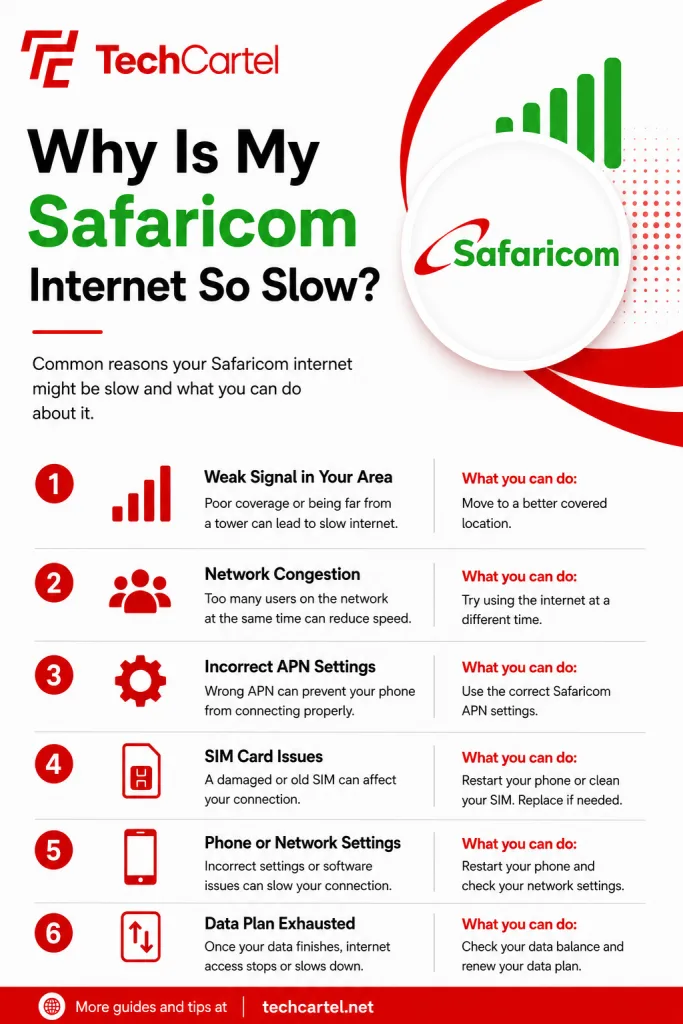
Cell towers only have a fixed amount of bandwidth to share among everyone connected in a given area. Between 6pm and 10pm, especially in busy places like Nairobi, Mombasa, and Nakuru, towers get packed with users at once, which drives up latency, causes packet loss, and drags speeds down noticeably. If your internet feels fine in the morning but crawls every evening, congestion is almost certainly the reason.
Related Article: How to Share Safaricom Data
Why Does Safaricom Throttle My Home Fibre Speed?
Home Fibre plans get marketed as unlimited, but each tier comes with a monthly Fair Usage Policy cap that quietly limits things once you cross it. Bronze users on 40 Mbps drop to 4 Mbps after passing 1.5 TB. Silver users on 60 Mbps fall to 8 Mbps past 2.0 TB. Gold subscribers on 150 Mbps get throttled to 20 Mbps once they hit 5.0 TB, and both Diamond and Platinum plans slow to 25 Mbps after 7.0 TB.
Mobile bundles work on a similar principle, with hourly and daily packages dropping to base speeds or pulling from airtime once the allocated data runs out.
Why Is My Phone Stuck On 3G Instead Of 4G?
A SIM swap, a system update, or a full device reset can sometimes mess with your phone’s Access Point Name profile, either wiping it or reverting it to an outdated version. When that happens, your phone stays locked on 3G even in areas with full 4G or 5G coverage, or it keeps dropping connection and stalling on page loads. Fixing the APN settings usually solves this within minutes.
Which Wi-Fi Band Should I Use For Faster Speed?
Safaricom Home Fibre and 5G Home routers broadcast on two separate bands, 2.4 GHz and 5 GHz. The 2.4 GHz band reaches further through walls, but it also picks up interference from neighboring Wi-Fi networks, household electronics, and Bluetooth devices, which caps speed around 20 to 30 Mbps.
Switching to the 5 GHz band clears up most of that interference and unlocks noticeably faster performance, provided you’re close enough to the router.
Related Article: How to Unsubscribe from Safaricom Subscriptions
Does My House Layout Affect My Safaricom Internet Speed?
Thick concrete walls, tin roofing, and basement rooms all block higher frequency 4G and 5G signals from reaching your device cleanly. When that happens, your phone keeps switching between 4G, 3G, and sometimes even 2G, which creates the lag spikes and buffering that make streaming or video calls painful. Where you sit in your home can affect how your connection performs.
How Do I Fix Slow Mobile Data On Safaricom
- Reset your network connection. Turn on Airplane Mode for ten seconds, then switch it back off. This forces your SIM to disconnect and reconnect to the strongest nearby tower.
- Correct your APN settings. Go to Mobile Network and Access Point Names, set the name to Safaricom Internet, the APN to safaricom or internet, leave the username and password blank, and set the APN type to default and supl. Save the profile and restart your phone.
- Lock your network type to 4G or 5G. Switch this from Auto to 4G or 5G under your network settings, which stops your phone from silently dropping to slower 3G connections.
- Check your bundle balance and FUP status. Dial *544# or *100#, or check the mySafaricom app, to confirm your main data is active and hasn’t expired or dropped into a slower promotional tier.
How Do I Fix Slow Home Fibre Or 5G Wi-Fi
- Restart your router. Unplug the power adapter, wait thirty to sixty seconds, then plug it back in. This clears the router’s internal memory and assigns a fresh IP address from Safaricom’s gateway.
- Connect to the 5G band. When choosing a network on your device, pick the one ending in underscore five G, since that band delivers faster speeds with far less interference than the 2.4 GHz option.
- Check your Fair Usage Policy status. Dial *400# and select Manage Subscription to see your current monthly usage and confirm if your connection has been throttled.
- Reposition your router. Move it to an open, elevated spot near the center of your home, away from thick walls, mirrors, microwaves, and other metal objects that block signal.
What Should I Do If Nothing Fixes The Problem
If you’ve gone through every fix above and your connection still lags, the issue might sit with Safaricom’s infrastructure in your specific area and not with your device or settings. Reaching out to Safaricom support directly, or checking their service status updates for your region, can confirm if there’s a known outage or planned maintenance nearby.
Related Article: How to Speak to a Safaricom Agent and Get Your Issue Resolved
Slow internet on Safaricom usually traces back to a handful of fixable causes: tower congestion during peak hours, Fair Usage Policy throttling, an outdated APN profile, Wi-Fi band interference, or a home layout that blocks signal. Working through the fixes above in order, starting with the simplest ones like a network reset or a router restart, clears up most problems within minutes. For anything that persists after that, Safaricom’s own support channels remain the fastest way to get a clear answer.