
Airtel Data Finishing Quickly can be frustrating, especially when you have barely spent any time browsing and your bundle is already much lower than expected. You may open WhatsApp, scroll through Instagram for a while, watch a few videos, or leave your phone connected to the internet, only to discover that a large amount of data has disappeared.
In most cases, the problem is not that Airtel is randomly taking your data. Your phone, apps, and online services can use mobile data in the background, sometimes without making it obvious.
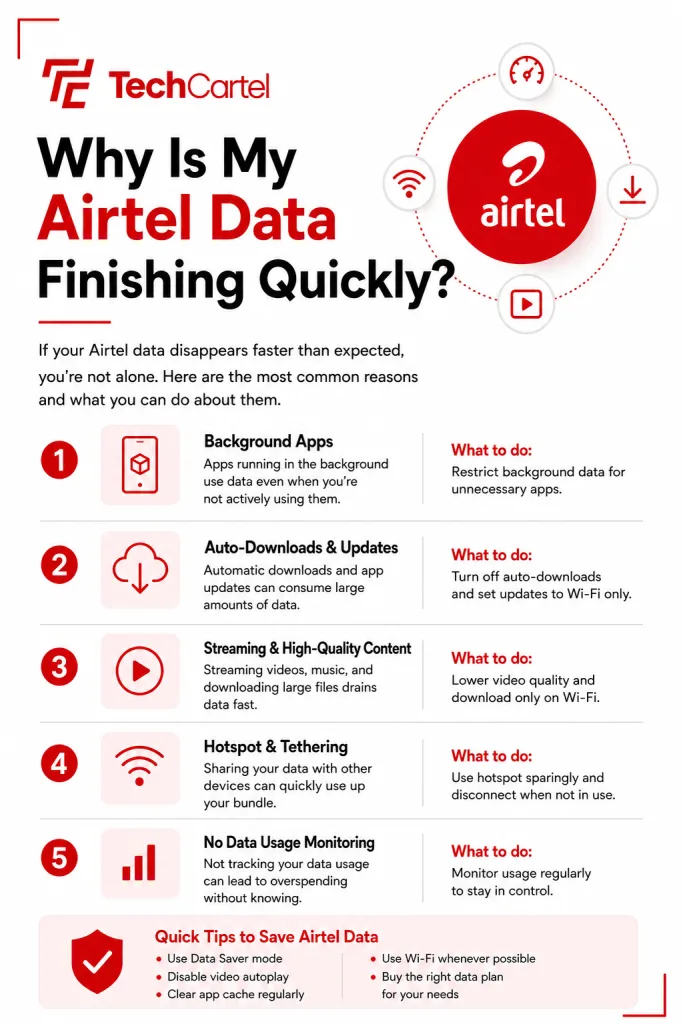
Video streaming, social media, automatic app updates, background activity, file downloads, cloud backups, email syncing, video calls, and online games can all consume mobile data. Airtel’s own support information lists several of these activities as common sources of high data usage.
The first thing to do is check which apps are using the most mobile data. Once you find the biggest users, you can change their settings and stop unnecessary activity.
Why Is My Airtel Data Finishing Quickly?
Your Airtel data may be finishing quickly because several apps and services are using mobile data at the same time.
Common causes include:
- Watching videos on YouTube, TikTok, Instagram, Facebook, or other platforms
- Streaming music and video
- Automatic app updates
- Apps refreshing content in the background
- Downloading large files
- WhatsApp automatically downloading photos and videos
- Cloud services uploading photos and videos
- Email apps syncing messages and attachments
- Video calls
- Online gaming
- Using your phone as a hotspot
- Automatic downloads and backups
Airtel also advises customers to check their data usage when their bundle finishes faster than expected. The easiest way to find the actual cause is to check your phone’s mobile data usage and look at the apps consuming the largest amount.
How Do I Check What Is Using My Airtel Data?
Your phone can show how much mobile data individual apps have used.
On Android, open Settings and search for Data Usage, Mobile Data Usage, or Data Usage by App. The name and location can differ between Samsung, Xiaomi, Tecno, Infinix, Google Pixel, and other Android phones.
On an iPhone, open Settings > Cellular or Settings > Mobile Service. You will see a list of apps and the amount of cellular data each one has used. Look for apps with unusually high usage. For example, if TikTok has used several gigabytes while you have only been using it for short periods, check its data settings. Do the same for Instagram, YouTube, WhatsApp, cloud storage apps, and other large data users.
Your phone’s data usage figure and Airtel’s balance may not always match perfectly because they are measured separately and may cover different periods. Use the phone’s usage screen to identify which apps are consuming data, then use Airtel’s balance check to see how much of your bundle remains.
Can Watching Videos Finish Airtel Data Quickly?
Yes. Video uses much more data than activities such as reading text or sending simple messages. The amount used depends on the video quality, the service you are using, how long you watch, and how the service delivers the video.
YouTube, TikTok, Instagram Reels, Facebook videos, Netflix, and other video services can therefore reduce a mobile data bundle quickly. Higher video quality generally uses more data. A long period of HD or higher quality streaming can consume considerably more data than watching the same content at a lower quality.
If you want your Airtel bundle to last longer, reduce video quality when using mobile data and avoid leaving videos playing when you are not watching them.
Can Instagram Finish My Airtel Data?
Yes. Instagram loads photos, videos, Stories, Reels, and other content as you use the app. Reels and other video content can use a significant amount of mobile data because the app has to load video files.
If Instagram appears near the top of your phone’s mobile data usage list, check its settings and use its data saving option where available. You can also reduce the amount of video you watch while using mobile data.
Can Background Apps Use Airtel Data?
Yes. Some apps can use mobile data while you are not actively using them.Background activity can include refreshing content, syncing information, checking for new messages, uploading files, and other tasks. This is one reason your data can decrease even when you have not spent much time browsing.
Check your phone’s mobile data usage settings to find apps using data in the background. You can then restrict background mobile data for apps that do not need it. Keep background access turned on for apps that you depend on for functions such as timely notifications.
Related Article: Airtel ODU Router: Price, Speed, and Subscription Plans
Are Automatic App Updates Using My Airtel Data?
They can. Apps receive updates regularly, and some devices can download these updates using mobile data depending on the settings you have selected. A large app update can consume a significant amount of data. Several updates downloaded around the same time can reduce your bundle even faster. Check your app store settings and choose WiFi for automatic updates when that option is available.
On Android, review the network preferences in the Google Play Store.
On iPhone, go to Settings > App Store and review the settings for automatic downloads and cellular data.
The exact options can differ according to your device and software version.
Can WhatsApp Use Too Much Airtel Data?
Yes. WhatsApp can use mobile data for messages, photos, videos, documents, voice calls, video calls, status updates, and other features. Automatic media downloads can be a major source of usage, especially when you belong to busy group chats where people send many videos and photos.
Open WhatsApp > Settings > Storage and Data and check the media auto download settings.
You can stop WhatsApp from automatically downloading large media files over mobile data. You can then download files manually when you actually need them.
Can Cloud Backup Finish My Airtel Data?
Yes. Photo and file backup services can upload content from your phone to the internet. This can include photos, videos, documents, and other files. A large collection of photos or videos can use a substantial amount of mobile data when uploaded.
Check the settings of apps such as Google Photos, iCloud, OneDrive, Dropbox, and other cloud services installed on your phone.
Where the app provides the option, set uploads to use WiFi instead of mobile data. This is especially useful after taking many videos or transferring a large number of files onto your phone.
Can Email Use My Airtel Data?
Yes. Email apps use data when they check for new messages and download content.
Large attachments can use considerably more data than ordinary text emails. An inbox containing many messages with photos, videos, documents, or other large attachments can also increase usage. Check your email application’s sync and download settings if you notice that it is consuming a lot of mobile data.
Can Airtel Hotspot Use All My Data?
Yes. Your phone’s hotspot allows another device to use your Airtel mobile data connection. A laptop, tablet, smart TV, or another phone connected to your hotspot can use data for video streaming, software updates, cloud backups, downloads, and other activities.
This can consume data much faster than ordinary phone browsing. Check the devices connected to your hotspot and turn it off when you are finished using it. If you regularly share your connection, also make sure your hotspot has a password so that people nearby cannot connect without your permission.
Related Article: How to Block People From Using Your WiFi
Can Downloads Finish My Airtel Data?
Yes. Large downloads can use a lot of mobile data in a short period. Movies, software, games, documents, operating system updates, and other large files can quickly reduce your balance. Check your downloads before starting them and use WiFi for large files when possible.
You should also check apps that automatically download files because you may not always notice when the download begins.
Can Video Calls Finish Airtel Data Quickly?
Yes. Video calls send and receive video continuously, so they can use much more data than ordinary text messaging. The amount used depends on the video quality, call length, number of participants, and the application.
Apps such as WhatsApp, Google Meet, Zoom, Microsoft Teams, and other video calling services can therefore use a significant amount of mobile data during long calls. Use WiFi for long video calls when possible. If you must use mobile data, check the app’s settings for options that reduce video quality or data usage.
Can Online Games Use Airtel Data?
Yes. Online games use mobile data when they connect to game servers and download or upload information. The amount used during ordinary gameplay can differ greatly between games. Game updates can also be much larger than the data used during a normal playing session.
Large updates are best downloaded over WiFi. If you play online games frequently, check the game’s data usage on your phone to see how much it is contributing to your overall consumption.
How Do I Make My Airtel Data Last Longer?
Start with the apps that are using the most data.
Then make the following changes:
- Lower video quality when using mobile data.
- Use WiFi for large downloads.
- Set app updates to use WiFi where possible.
- Restrict background mobile data for apps that do not need it.
- Review WhatsApp’s automatic media downloads.
- Check cloud backup settings.
- Reduce unnecessary video streaming.
- Turn off your hotspot when you are not using it.
- Review email syncing if your email app uses a lot of data.
- Check your phone’s mobile data usage regularly.
- Use data saving options available in apps such as Instagram and other social platforms.
- Avoid downloading large files over mobile data unless necessary.
You do not need to change every setting on your phone. Start with the apps that have the highest data usage.
Related Article: How to Know Who is Sharing Your Mobile Data Without Permission
How Do I Check My Airtel Data Balance?
Dial 323# from your Airtel line to check your data balance. You can also check your balance through the My Airtel app.
Checking your balance regularly can help you notice how quickly your bundle is being used. For example, you can check your balance before a long period of video streaming and check it again afterwards. Your phone’s data usage screen can then help you identify which app used the data.
How Do I Buy Airtel Data?
You can buy Airtel data by dialing *312#, using the My Airtel app, or through your bank’s app, website, or USSD service.
The available plans and prices can change, so check the current options through *312# or the My Airtel app before subscribing.
Can Airtel Data Stop Automatically When It Finishes?
When you subscribe to an Airtel data plan, you can choose auto renewal or no auto renewal. With auto renewal selected, your plan renews after expiry when you have enough airtime. With no auto renewal selected, your internet access ends when the plan expires, and you need to subscribe to another plan. This setting is separate from how quickly your existing data is consumed.
What Should I Do If My Airtel Data Is Finishing Without Heavy Use?
Start by checking your phone’s mobile data usage. Look at the apps with the highest usage and check their settings. Pay particular attention to video apps, social media, WhatsApp, cloud backup services, automatic updates, email, downloads, and apps using background data.
Then check your Airtel balance by dialing *323#.
If your phone shows very little mobile data usage but your Airtel balance is dropping much faster than expected, contact Airtel customer care and provide the details of the issue so they can check your account.
Airtel data can finish quickly when your phone is using mobile data for activities such as video streaming, social media, automatic app updates, background activity, downloads, WhatsApp media, cloud backups, email, video calls, online games, and hotspot connections.
The best way to find the cause is to check your phone’s mobile data usage and identify the apps consuming the most. Once you know which apps are responsible, you can reduce their data usage, restrict background activity, stop automatic downloads, or use WiFi for larger activities. You can check your Airtel data balance with *323# and view available Airtel data plans with *312#.