
WhatsApp Business has become one of the most relied upon selling tools across Africa. Millions of small businesses use it daily to take orders, share catalogs, and communicate with customers. That makes a sudden suspension one of the most disruptive things that can happen to an active seller. If you are dealing with a WhatsApp Business account suspended message, this post covers exactly why it happened, how to appeal it correctly, and what to do going forward.
Why Your WhatsApp Business Account Was Suspended
Meta’s enforcement system is largely automated, and it moves fast. Understanding what triggered the suspension is the first step toward getting the account back.
Spam Reports
This is the most common cause. Meta monitors what is called a Spam Report Rate in real time. As of 2026, if more than 0.3% of your sent messages result in a user tapping Report or Block, the system automatically throttles or suspends your account. That threshold is lower than most sellers expect.
Messaging Without Consent
Sending promotional or marketing messages to people who never explicitly agreed to receive them on WhatsApp is a direct policy violation. If a customer did not check a box, fill a form, or send you a message first, messaging them with offers puts your account at risk.
Bulk Messaging and Unauthorized Automation
Using third-party tools, browser extensions, or unofficial WhatsApp mods to send large volumes of messages at once is one of the fastest ways to trigger a ban. Meta’s detection for browser-based automation is highly accurate, and purchased contact lists make the situation worse. If someone receives your message without having saved your number and reports it, your Quality Rating drops immediately.
Scripted Promotional Funnels
Automatically sending a welcome message followed immediately by prices, catalogs, or images in quick succession is now flagged by Meta as a scripted promotional funnel. The sequencing itself can trigger a review, regardless of the content.
Restricted Business Categories
Meta bans accounts operating in certain industries outright, even when those accounts have customer consent. The prohibited categories include money gambling and betting, firearms, alcohol, tobacco, adult content, unsafe supplements such as unverified weight loss or performance-enhancing products, multi-level marketing schemes, and tools designed to bypass digital locks or access restricted media.
VoIP Numbers
Registering a WhatsApp Business account on a virtual or internet-only phone number instead of a verified mobile SIM or landline is a violation of Meta’s current verification standards.
The AI Assistant Ban
As of January 15, 2026, Meta explicitly prohibits general-purpose AI chatbots operating as standalone services on the platform. If your business account functions primarily as an AI chat service, it will be suspended.
Portfolio-Level Risk
Since late 2025, suspensions are no longer isolated to a single phone number. If you manage multiple numbers under one Meta Business Manager account, a ban on one number can affect the others. All numbers under the same account share a single Portfolio Quality rating.
How to Appeal a Suspended Account
Before doing anything else, stop all third-party tools, automation apps, and unofficial WhatsApp mods immediately. Continuing to use them during the review period significantly reduces the chance of a successful appeal and can result in a permanent ban.
Step One: Check What Type of Suspension You Have
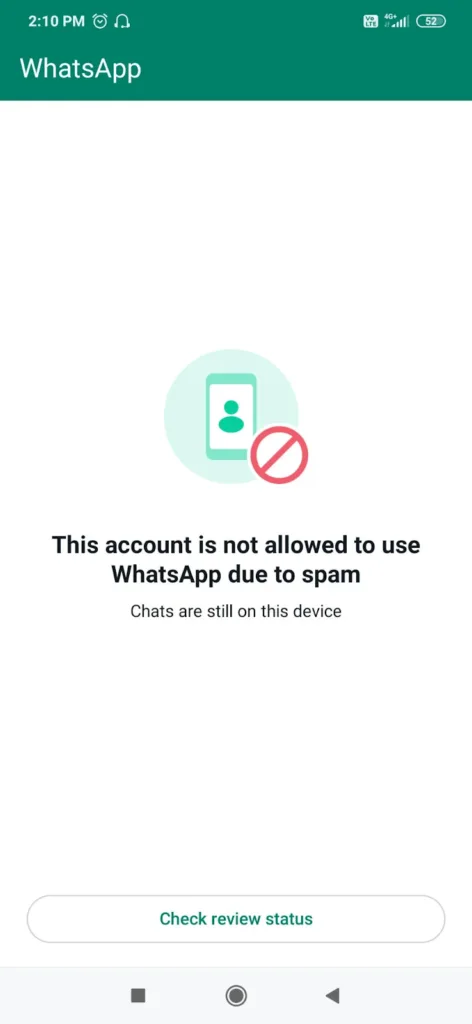
If you open WhatsApp Business and see a countdown timer alongside the suspension message, it is a temporary ban. These are usually lifted within 24 to 72 hours. If the message reads “This account is not allowed to use WhatsApp” with no timer, it is a permanent ban and requires a formal appeal through the Meta Business Suite.
Step Two: Submit the In-App Appeal
For temporary suspensions, the in-app appeal is the most direct route back. Open WhatsApp Business, tap Request a Review when prompted, and write a short, professional explanation. Keep it simple and factual. Something along the lines of: “I believe my account was flagged by mistake. I have reviewed the policies and confirmed that my messaging is compliant. I kindly request a review.” Aggressive or demanding appeals are consistently rejected by Meta’s automated filters. Meta currently responds to in-app appeals within 6 to 24 hours.
Step Three: Use Meta Business Suite for API Users
If you use the WhatsApp Business API, log into your Meta Business Suite, go to WhatsApp Manager, then Account Quality, and look for the alert banner at the top of the page. Select the affected account and click Request Review from there.
A Word on WhatsApp Ban “Fixers”
If your account gets suspended, you will likely be approached by individuals or services offering to restore it for a fee. There is no third-party pathway to appeal a WhatsApp Business suspension. The only legitimate recovery routes are the in-app appeal and the Meta Business Suite review process described above. Paying someone to fix a suspension is not only ineffective, it often involves handing over account credentials, which creates a separate security risk entirely.
How to Protect Your WhatsApp Account
Get consent before messaging: Only send promotional content to people who have actively agreed to receive it, through a form, a checkbox, or by initiating the conversation themselves.
Personalize your messages: Sending the exact same text and image to hundreds of contacts in a short window is one of the clearest signals of spam behavior to Meta’s system.
Use only official tools: The official WhatsApp Business app and Meta-authorized Business Solution Providers are the only safe options for automation. Any tool outside that list carries enforcement risk.
Watch your Quality Rating: If you use the WhatsApp API, monitor your Quality Rating inside the Meta dashboard regularly. If it turns red, stop sending broadcast messages immediately and allow it to recover before resuming.
A suspended account is recoverable in most cases, provided the appeal is handled correctly and all policy violations are addressed before the review is submitted. The enforcement system is automated and does not respond well to urgency or frustration. A calm, factual appeal submitted through the official channels is the most reliable path back.